解説:9−7−1
このプログラムも難しく考える事はない。
まず、楕円を1つだけで考えよう。
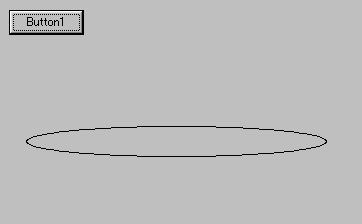
楕円1つのプログラム(j=1の時)
procedure TForm1.Button1Click(Sender: TObject);
const pai = 3.1415;
var x, y, xt, yt, a, b, incr, th, angle,
th2, angle2: real;
i, j, n, xc, yc, xi, yi : integer;
begin
n := 200;
a := 150;
b := 15;
xc := 300;
yc := 200;
incr := 360 / n;
angle2 := 0;
for j := 1 to 1 do begin
th2 := pai * angle2 / 180;
angle := 0;
for i := 0 to n do begin
th := pai * angle / 180;
x := a * cos(th);
y := b * sin(th);
xt := x * cos(th2) - y
* sin(th2);
yt := x * sin(th2) + y
* cos(th2);
xi := round(xc + xt);
yi := round(yc - yt);
if ( i = 0 ) then begin
Canvas.MoveTo(xi,yi)
end
else begin
Canvas.LineTo(xi,yi);
end;
angle := angle + incr;
end;
angle2 := angle2 + 30;
end;
end;
end.
結果:
jが1の時とは回転移動する前のそのままの楕円なので、
for i := 0 to n do begin
th := pai * angle / 180;
x := a * cos(th);
y := b * sin(th);
xt := x * cos(th2) - y
* sin(th2);
yt := x * sin(th2) + y
* cos(th2);
xi := round(xc + xt);
yi := round(yc - yt);
if ( i = 0 ) then begin
Canvas.MoveTo(xi,yi)
end
else begin
Canvas.LineTo(xi,yi);
end;
angle := angle + incr;
end;
この部分が楕円を描くプログラム。
j=1の時はangle2には0が代入されているので、もちろんth2も0である。
この時、
xt := x * cos(0) - y *
sin(0);
yt := x * sin(0) + y *
cos(0);
なので、
xt := x;
yt := y;
となり、そのまま楕円が描かれる。